
Hola, secuaces:
¿Alguna vez has querido escribir sobre algo, pero has sentido que ese algo se te 'atraganta'? ¿Alguna vez te has quedado bloqueado? Pues eso es lo que me ha ocurrido con este artículo, donde quiero mostrar mi punto de vista sobre el triage y la creación de imágenes forenses. Estoy 'espeso', (más de lo habitual). Sé lo que quería contar, pero no sabía muy bien cómo plantearlo.
Hace algún tiempo leí un fantástico artículo de Brett Shavers, (te recomiendo encarecidamente que lo leas), que lleva por título "Forensic imaging raises its head", y que publicó a raíz de un tweet de ForensicFocus. En dicho artículo, Brett, expone su opinión al respecto. ¿Triage o imaging?
Comparto plenamente la misma opinión que Brett en su artículo.
Personalmente, si dispongo del tiempo necesario, tengo los recursos necesarios, tengo autoridad y estoy capacitado... haré una imagen forense. Como siempre, todo dependiendo del caso de que se trate, (si es que puedes saber lo que te vas a encontrar antes de comenzar un análisis en una investigación forense).
Antes de continuar, permíteme hacer una observación...
La adquisición del volcado de memoria es una tarea prioritaria en cualquier caso en el que haya que intervenir en un sistema, tal y como expuse en un artículo anterior, debido a la gran importancia y gran volatilidad de los datos que contiene. Por ello hay que separarla de otros procesos de recolección, (como el triage), puesto que afectan negativamente a los datos almacenados en la memoria. Es decir, no se debe efectuar el volcado de memoria dentro de un proceso de triage.
Se ha escrito mucho, en muchos sitios, sobre el triage. No es un campo en el que yo haya profundizado. No es algo en lo que vaya a profundizar en este artículo.
Cuando se efectúa un triage, se recolecta, únicamente, información 'importante', (entrecomillado porque, ¿Qué es información importante?), por lo que se reduce el tiempo de adquisición y posterior análisis. Se buscan elementos específicos y necesarios para iniciar una posterior investigación, más profunda y exhaustiva. Al fin y al cabo, cuando se declara un incidente o se precisa intervenir en un sistema para realizar un examen previo de actividad, se necesitan datos rápidos.
Si el examen previo, (triage), se realiza de una manera satisfactoria, los investigadores podrán extraer información necesaria y de interés, para otro proceso posterior.
El triage es, sin duda alguna, una solución práctica para hacer frente a una investigación en la que el tiempo es un factor crítico, reduciendo el volumen de datos. Todo sea por tener un flujo de trabajo 'eficiente'. Pero lo que puedes creer como algo eficiente a veces no es lo mejor, lo más óptimo.
Por poner un ejemplo, podrías tener que intervenir en un sistema que está implicado, aparentemente, en un delito menor, (como una intrusión en otro sistema de una pequeña empresa), por lo que optas por realizar un triage. Pero cuando comiences con el análisis podrías ver que se trata de un delito mayor, (como un delito de terrorismo o de pornografía infantil). Con esto quiero decir que tú no sabrás realmente el alcance de una investigación hasta que no inicias la misma.
Hay que buscar un equilibrio.
Existen multitud de herramientas para efectuar un triage. Herramientas que provocan ruido. Ruido que puede hacer mucho daño en los ojos del investigador, cuando tenga que analizar una imagen forense.

Entiéndase por ruido la alteración masiva e innecesaria de datos que se provoca en un sistema que, además, puede provocar la pérdida de otros datos de interés. Pérdida de datos de interés que me gusta traducir como 'contaminación'.
Ese ruido no lo verás cuando estés analizando los datos extraídos mediante la realización de un triage. Pero sí lo verás en la posterior creación de una imagen forense, llegados el caso.
Como decía antes, existen multitud de herramientas para efectuar un triage. Tienes a tu disposición pequeñas utilidades, como las propias de NirSoft, (como LastActivityView o USBDeview). También tienes las propias de SysInternals, (como Autoruns o TCPView). Tienes a tu disposición distribuciones linux, enfocadas al análisis forense digital, que poseen otro conjunto de pequeñas utilidades, como pueden ser Tsurugi Linux, (con Bento), o Caine, (con WinUFO en versiones anteriores). Tienes a tu disposición un montón de herramientas, que ejecutan un conjunto de pequeñas utilidades, de terceras partes.
También tienes que tener en cuenta que, algunas de esas herramientas que ejecutan otro conjunto de utilidades de terceros, pueden ser detectadas como maliciosas y pueden hacer saltar las alarmas.
Y, ante esa situación, ¿Qué haces? ¿Desconectas el antivirus? Sea como fuere, ese simple hecho se traduce en una alteración, quizás innecesaria, del sistema.
Todo depende del caso, porque debes tener un plan.

Con el uso de AChoir se han producido un total de 235.904 eventos.
Realizo dos filtrados más para ver cómo afecta al sistema su ejecución.
Esta herramienta ha provocado un total de 3.176 eventos de escritura en ficheros.


Y un total de 2.936 eventos de creación de ficheros.


Tras efectuar la línea de tiempo y mostrando únicamente las líneas que se encuentran entre la ejecución de la herramienta y su finalización, se muestran un total de 12.724 líneas de actividad.


Con el uso de BambiRaptor se han producido un total de 7.482.923 eventos.
Realizo dos filtrados más para ver cómo afecta al sistema su ejecución.
Esta herramienta ha provocado un total de 15.237 eventos de escritura en ficheros.


Y un total de 268.187 eventos de creación de ficheros.


Tras efectuar la línea de tiempo y mostrando únicamente las líneas que se encuentran entre la ejecución de la herramienta y su finalización, se muestran un total de 46.384 líneas de actividad.


Con el uso de CyLR se han producido un total de 16.601 eventos.
Realizo dos filtrados más para ver cómo afecta al sistema su ejecución.
Esta herramienta ha provocado un total de 958 eventos de escritura en ficheros.


Y un total de 113 eventos de creación de ficheros.


Tras efectuar la línea de tiempo y mostrando únicamente las líneas que se encuentran entre la ejecución de la herramienta y su finalización, se muestran un total de 507 líneas de actividad.


Con el uso de FastIR se han producido un total de 26.386 eventos.
Realizo dos filtrados más para ver cómo afecta al sistema su ejecución.
Esta herramienta ha provocado un total de 1.712 eventos de escritura en ficheros.


Y un total de 5.947 eventos de creación de ficheros.


Tras efectuar la línea de tiempo y mostrando únicamente las líneas que se encuentran entre la ejecución de la herramienta y su finalización, se muestran un total de 6.420 líneas de actividad.



Con el uso de KAPE se han producido un total de 177.507 eventos.
Realizo dos filtrados más para ver cómo afecta al sistema su ejecución.
Esta herramienta ha provocado un total de 1.840 eventos de escritura en ficheros.


Y un total de 6.455 eventos de creación de ficheros.


Tras efectuar la línea de tiempo y mostrando únicamente las líneas que se encuentran entre la ejecución de la herramienta y su finalización, se muestran un total de 6.918 líneas de actividad.


Estas pruebas de triage han sido llevadas a cabo en el mismo instante en el que se ha llevado a cabo una acción determinada. Imagina por un momento qué puedes encontrar, (o que no vas a encontrar), en un sistema donde el tiempo transcurrido entre una acción y la intervención es de horas, días, o incluso semanas.
Visto el 'ruido' que son capaces de generar algunas herramientas, yo soy partidario de, siempre que sea posible, adquirir una imagen forense. Ya habrá tiempo de extraer los artefactos que hagan falta.
Un triage puede ser efectivo en algunos casos, si se usa la herramienta adecuada, o el procedimiento correcto. Ten en cuenta que, lo que tú crees que puede ser una opción adecuada se puede traducir en un procedimiento ineficaz de clasificación de artefactos y, por ende, de la priorización del caso que se trate.
Ser rápido en la extracción de datos no te garantiza que extraigas los datos necesarios para tu investigación. Busca un equilibrio. Planea bien tus pasos, porque sólo tendrás una oportunidad de efectuar un triage, (a menos que quieras generar más ruido y perder más datos).
Lo eficiente no suele ser lo más rápido. Cuando intervienes en un sistema, no sabes realmente qué puedes encontrar en él.
Si usas alguna herramienta, usa la adecuada para cada caso. Por ejemplo, la herramienta Live Response Collection BambiRaptor no extrae los logs transaccionales del Registro. Sin embargo, CyLR o KAPE sí los extraen. Por ejemplo, CyLR no genera reportes con la extracción de datos, mientras que KAPE sí lo hace.
Debes saber que, al igual que hay situaciones en las que no es posible apagar el sistema para realizar una imagen forense, (por lo que hay que adquirirla con el sistema vivo), también existen situaciones en las que puedes desconectar el sistema para efectuar un triage, (por lo que se evitará el ruido innecesario). Desconectar. No apagar. Porque la diferencia entre un paso y otro se traduce, de igual manera, en pérdida de información.

Por ejemplo, en esta prueba, el sistema ha generado 178 líneas al iniciar el proceso de apagado, mientras que al desconectar el sistema no se genera actividad alguna.


Esto es todo.
Marcos
¿Alguna vez has querido escribir sobre algo, pero has sentido que ese algo se te 'atraganta'? ¿Alguna vez te has quedado bloqueado? Pues eso es lo que me ha ocurrido con este artículo, donde quiero mostrar mi punto de vista sobre el triage y la creación de imágenes forenses. Estoy 'espeso', (más de lo habitual). Sé lo que quería contar, pero no sabía muy bien cómo plantearlo.
Hace algún tiempo leí un fantástico artículo de Brett Shavers, (te recomiendo encarecidamente que lo leas), que lleva por título "Forensic imaging raises its head", y que publicó a raíz de un tweet de ForensicFocus. En dicho artículo, Brett, expone su opinión al respecto. ¿Triage o imaging?
Comparto plenamente la misma opinión que Brett en su artículo.
Personalmente, si dispongo del tiempo necesario, tengo los recursos necesarios, tengo autoridad y estoy capacitado... haré una imagen forense. Como siempre, todo dependiendo del caso de que se trate, (si es que puedes saber lo que te vas a encontrar antes de comenzar un análisis en una investigación forense).
Antes de continuar, permíteme hacer una observación...
La adquisición del volcado de memoria es una tarea prioritaria en cualquier caso en el que haya que intervenir en un sistema, tal y como expuse en un artículo anterior, debido a la gran importancia y gran volatilidad de los datos que contiene. Por ello hay que separarla de otros procesos de recolección, (como el triage), puesto que afectan negativamente a los datos almacenados en la memoria. Es decir, no se debe efectuar el volcado de memoria dentro de un proceso de triage.
Se ha escrito mucho, en muchos sitios, sobre el triage. No es un campo en el que yo haya profundizado. No es algo en lo que vaya a profundizar en este artículo.
Cuando se efectúa un triage, se recolecta, únicamente, información 'importante', (entrecomillado porque, ¿Qué es información importante?), por lo que se reduce el tiempo de adquisición y posterior análisis. Se buscan elementos específicos y necesarios para iniciar una posterior investigación, más profunda y exhaustiva. Al fin y al cabo, cuando se declara un incidente o se precisa intervenir en un sistema para realizar un examen previo de actividad, se necesitan datos rápidos.
Si el examen previo, (triage), se realiza de una manera satisfactoria, los investigadores podrán extraer información necesaria y de interés, para otro proceso posterior.
El triage es, sin duda alguna, una solución práctica para hacer frente a una investigación en la que el tiempo es un factor crítico, reduciendo el volumen de datos. Todo sea por tener un flujo de trabajo 'eficiente'. Pero lo que puedes creer como algo eficiente a veces no es lo mejor, lo más óptimo.
Por poner un ejemplo, podrías tener que intervenir en un sistema que está implicado, aparentemente, en un delito menor, (como una intrusión en otro sistema de una pequeña empresa), por lo que optas por realizar un triage. Pero cuando comiences con el análisis podrías ver que se trata de un delito mayor, (como un delito de terrorismo o de pornografía infantil). Con esto quiero decir que tú no sabrás realmente el alcance de una investigación hasta que no inicias la misma.
Hay que buscar un equilibrio.
El precio a pagar por la extracción rápida de datos es la pérdida de datos.En este punto me veo en la obligación de mencionar a nuestro amigo Locard, porque no he visto que se hable de él cuando se habla del triage. No he visto a nadie hablar sobre algo que, personalmente, creo importante. El ruido.
Existen multitud de herramientas para efectuar un triage. Herramientas que provocan ruido. Ruido que puede hacer mucho daño en los ojos del investigador, cuando tenga que analizar una imagen forense.

Entiéndase por ruido la alteración masiva e innecesaria de datos que se provoca en un sistema que, además, puede provocar la pérdida de otros datos de interés. Pérdida de datos de interés que me gusta traducir como 'contaminación'.
Ese ruido no lo verás cuando estés analizando los datos extraídos mediante la realización de un triage. Pero sí lo verás en la posterior creación de una imagen forense, llegados el caso.
Como decía antes, existen multitud de herramientas para efectuar un triage. Tienes a tu disposición pequeñas utilidades, como las propias de NirSoft, (como LastActivityView o USBDeview). También tienes las propias de SysInternals, (como Autoruns o TCPView). Tienes a tu disposición distribuciones linux, enfocadas al análisis forense digital, que poseen otro conjunto de pequeñas utilidades, como pueden ser Tsurugi Linux, (con Bento), o Caine, (con WinUFO en versiones anteriores). Tienes a tu disposición un montón de herramientas, que ejecutan un conjunto de pequeñas utilidades, de terceras partes.
También tienes que tener en cuenta que, algunas de esas herramientas que ejecutan otro conjunto de utilidades de terceros, pueden ser detectadas como maliciosas y pueden hacer saltar las alarmas.
Y, ante esa situación, ¿Qué haces? ¿Desconectas el antivirus? Sea como fuere, ese simple hecho se traduce en una alteración, quizás innecesaria, del sistema.
Todo depende del caso, porque debes tener un plan.
Debes elegir el procedimiento y la herramienta adecuados para cada caso.Y es aquí donde quiero llegar a parar. Es aquí donde voy a exponer mi opinión, con datos objetivos. Para ello, (y tras algunos quebraderos de cabeza y otros asuntos), he optado por realizar una serie de pruebas de triage en un sistema Windows 10, versión 18343.1, virtualizado bajo VirtualBox, con las siguientes herramientas, (gratuitas todas ellas):
Después de instalar el sistema virtualizado, conecté un dispositivo USB en el sistema y llevé a cabo una única acción. Tras efectuar esa acción, guardé el estado de la máquina virtual y creé un clon para cada una de las herramientas citadas. También creé un clon para proceder con un apagado normal del sistema. Una vez creados los clones de la máquina virtual, adelanté la fecha del sistema y procedí con la ejecución de la correspondiente herramienta de triage, desconectando la máquina virtual en el mismo instante en que cada una de las herramientas finaliza su ejecución. Al finalizar, desconecté la máquina original, como si le hubiera cortado el suministro eléctrico.
El proceso de adquisición de cada una de las herramientas mencionadas ha sido monitorizado con la utilidad Process Monitor v3.50, excluyendo las rutas de ejecución y de salida de los datos, e incluyendo únicamente la actividad relativa a los procesos implicados en la operación.
En adición a ese proceso de monitarización que he llevado a cabo, también he realizado una superlínea de tiempo con Plaso, que posteriormente he visualizado con Timeline Explorer.
A continuación te muestro mis resultados, sin entrar a valorar qué información extrae cada una de las herramientas.
AChoir


Con el uso de AChoir se han producido un total de 235.904 eventos.
Realizo dos filtrados más para ver cómo afecta al sistema su ejecución.
Esta herramienta ha provocado un total de 3.176 eventos de escritura en ficheros.


Y un total de 2.936 eventos de creación de ficheros.


Tras efectuar la línea de tiempo y mostrando únicamente las líneas que se encuentran entre la ejecución de la herramienta y su finalización, se muestran un total de 12.724 líneas de actividad.


Live Response Collection BambiRaptor


Con el uso de BambiRaptor se han producido un total de 7.482.923 eventos.
Realizo dos filtrados más para ver cómo afecta al sistema su ejecución.
Esta herramienta ha provocado un total de 15.237 eventos de escritura en ficheros.
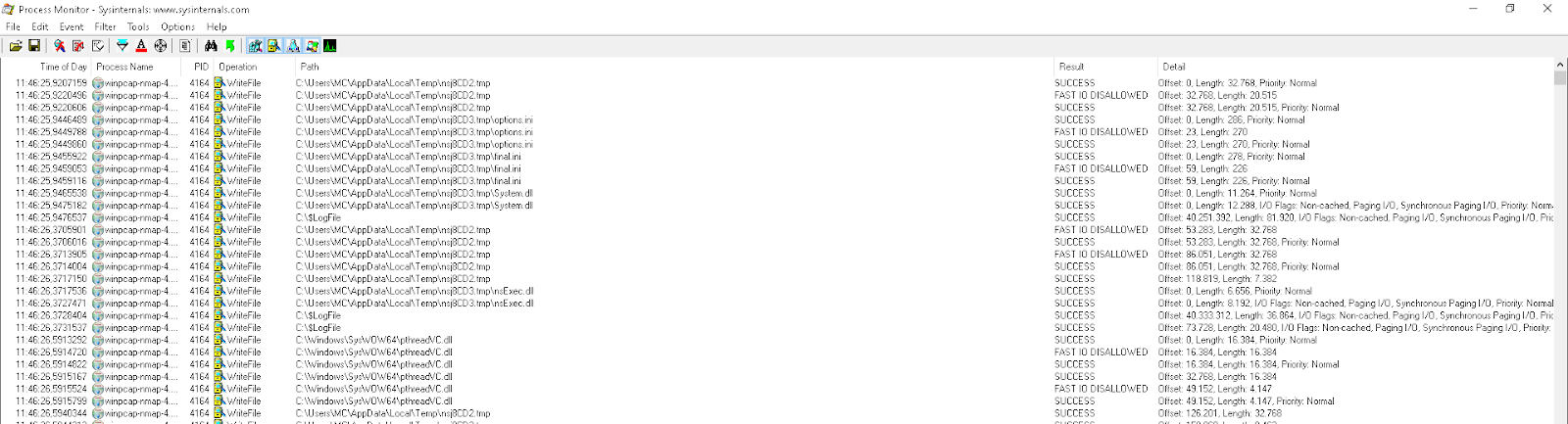

Y un total de 268.187 eventos de creación de ficheros.


Tras efectuar la línea de tiempo y mostrando únicamente las líneas que se encuentran entre la ejecución de la herramienta y su finalización, se muestran un total de 46.384 líneas de actividad.


CyLR


Con el uso de CyLR se han producido un total de 16.601 eventos.
Realizo dos filtrados más para ver cómo afecta al sistema su ejecución.
Esta herramienta ha provocado un total de 958 eventos de escritura en ficheros.


Y un total de 113 eventos de creación de ficheros.


Tras efectuar la línea de tiempo y mostrando únicamente las líneas que se encuentran entre la ejecución de la herramienta y su finalización, se muestran un total de 507 líneas de actividad.


FastIR


Con el uso de FastIR se han producido un total de 26.386 eventos.
Realizo dos filtrados más para ver cómo afecta al sistema su ejecución.
Esta herramienta ha provocado un total de 1.712 eventos de escritura en ficheros.


Y un total de 5.947 eventos de creación de ficheros.


Tras efectuar la línea de tiempo y mostrando únicamente las líneas que se encuentran entre la ejecución de la herramienta y su finalización, se muestran un total de 6.420 líneas de actividad.


KAPE


Con el uso de KAPE se han producido un total de 177.507 eventos.
Realizo dos filtrados más para ver cómo afecta al sistema su ejecución.
Esta herramienta ha provocado un total de 1.840 eventos de escritura en ficheros.


Y un total de 6.455 eventos de creación de ficheros.


Tras efectuar la línea de tiempo y mostrando únicamente las líneas que se encuentran entre la ejecución de la herramienta y su finalización, se muestran un total de 6.918 líneas de actividad.


Conclusiones
Estas pruebas de triage han sido llevadas a cabo en el mismo instante en el que se ha llevado a cabo una acción determinada. Imagina por un momento qué puedes encontrar, (o que no vas a encontrar), en un sistema donde el tiempo transcurrido entre una acción y la intervención es de horas, días, o incluso semanas.
Visto el 'ruido' que son capaces de generar algunas herramientas, yo soy partidario de, siempre que sea posible, adquirir una imagen forense. Ya habrá tiempo de extraer los artefactos que hagan falta.
Un triage puede ser efectivo en algunos casos, si se usa la herramienta adecuada, o el procedimiento correcto. Ten en cuenta que, lo que tú crees que puede ser una opción adecuada se puede traducir en un procedimiento ineficaz de clasificación de artefactos y, por ende, de la priorización del caso que se trate.
Ser rápido en la extracción de datos no te garantiza que extraigas los datos necesarios para tu investigación. Busca un equilibrio. Planea bien tus pasos, porque sólo tendrás una oportunidad de efectuar un triage, (a menos que quieras generar más ruido y perder más datos).
Lo eficiente no suele ser lo más rápido. Cuando intervienes en un sistema, no sabes realmente qué puedes encontrar en él.
Si usas alguna herramienta, usa la adecuada para cada caso. Por ejemplo, la herramienta Live Response Collection BambiRaptor no extrae los logs transaccionales del Registro. Sin embargo, CyLR o KAPE sí los extraen. Por ejemplo, CyLR no genera reportes con la extracción de datos, mientras que KAPE sí lo hace.
Debes saber que, al igual que hay situaciones en las que no es posible apagar el sistema para realizar una imagen forense, (por lo que hay que adquirirla con el sistema vivo), también existen situaciones en las que puedes desconectar el sistema para efectuar un triage, (por lo que se evitará el ruido innecesario). Desconectar. No apagar. Porque la diferencia entre un paso y otro se traduce, de igual manera, en pérdida de información.

Por ejemplo, en esta prueba, el sistema ha generado 178 líneas al iniciar el proceso de apagado, mientras que al desconectar el sistema no se genera actividad alguna.


Piensa en el ruido. Ruido que molesta, que hace daño a los ojos y que conlleva una pérdida de datos.
El único objetivo de este artículo ha sido el de mostrar que las herramientas que ejecutamos generan ruido durante su ejecución. Es cierto que mucho de ese ruido generado corresponde a eventos de sólo lectura. Pero no por ello dejan de ser eventos. Incluso dentro de los eventos de escritura de ficheros y de creación de ficheros, se repiten los mismos eventos de escritura y creación, sobre los mismos eventos. Pero esos eventos, están ahí.
En lo referente a los eventos de escritura de ficheros y de creación de ficheros, debo decir que mi principal preocupación radica en que cuando se escribe sobre un fichero, ese fichero aumenta de tamaño y que, cuando se crea un fichero, se asigna una entrada en la MFT. Si nos encontramos con un caso donde se ha eliminado un cierto tipo de contenido, (llámalo 'X'), el aumento de tamaño de un fichero conlleva la asignación de un clúster que podría ser el clúster asignado anteriormente a esa información borrada. El caso de la creación de un fichero también me preocupa porque cuando un archivo es eliminado, el sistema borra su correspondiente registro en la MFT, que puede ser sobreescrito por ese nuevo fichero creado, a raíz del evento de creación de un archivo.
También me preocupan esos eventos que se producen, en relación con el tiempo transcurrido desde el incidente. Es decir, no es raro encontrar incidentes que han ocurrido desde hace días, o incluso semanas. Y esos eventos que se produce pueden tener repercusiones sobre ciertos logs del sistema. Por exponer un ejemplo, los eventos '.evtx' tienen, por defecto, un valor máximo de 20480 KB.
¿He efectuado estas pruebas para ver qué información se puede perder, durante la ejecución de una herramienta de triage? No. No he efectuado esas pruebas, pero es posible que lo haga en un futuro. El objetivo de este artículo es el de mostrar que las herramientas que ejecutamos, generan ruido. Nada más.
También es cierto que, dentro de todos esos eventos, se encontrarán eventos que pueden no influir directamente sobre los artefactos que podamos encontrar en un sistema. Pero eso es algo que no se sabrá hasta que no se analice el mismo.
En ningún momento pretendo realizar una comparativa sobre si una herramienta es mejor que otra. Existen docenas de herramientas para efectuar un triage. No he comparado todas ellas. Tan sólo he realizado unas pruebas, (creo que objetivas), sobre algunas de las herramientas que más uso yo.
Existen herramientas que permiten elegir si recolectar artefactos o sólo informes, existen herramientas que te permiten elegir qué artefactos recolectar y existen herramientas que no te permiten elegir nada, más allá de la propia ejecución de esa herramienta. Por ello, durante estas pruebas, he optado por ejecutar cada herramienta con sus máximas opciones. Porque no sería justo ejecutar una herramienta que permite unas opciones mínimas con otra herramienta que no permite opción alguna.
No me gusta recomendar herramientas porque cada herramienta tiene su sitio, según el caso de que se trate. No me gusta verter opiniones sobre herramientas. Sólo me gusta hablar sobre cosas que he visto con mis propios ojos, (con mis propias pruebas). Lo aquí expuesto son únicamente mis pruebas.
Es el usuario final el que debe valorar, y conocer, qué herramientas tiene a su disposición, saber elegir la adecuada para cada caso y entender su funcionamiento, y los riesgos que pueda entrañar su uso, o no. Al final, todo depende de muchos factores, pero es el usuario final quien tiene la última palabra, con su elección.
Y todo esto, son sólo mis cosas. Las cosas de un mero curioso en la materia.
Actualización: 20 de mayo de 2019
El único objetivo de este artículo ha sido el de mostrar que las herramientas que ejecutamos generan ruido durante su ejecución. Es cierto que mucho de ese ruido generado corresponde a eventos de sólo lectura. Pero no por ello dejan de ser eventos. Incluso dentro de los eventos de escritura de ficheros y de creación de ficheros, se repiten los mismos eventos de escritura y creación, sobre los mismos eventos. Pero esos eventos, están ahí.
En lo referente a los eventos de escritura de ficheros y de creación de ficheros, debo decir que mi principal preocupación radica en que cuando se escribe sobre un fichero, ese fichero aumenta de tamaño y que, cuando se crea un fichero, se asigna una entrada en la MFT. Si nos encontramos con un caso donde se ha eliminado un cierto tipo de contenido, (llámalo 'X'), el aumento de tamaño de un fichero conlleva la asignación de un clúster que podría ser el clúster asignado anteriormente a esa información borrada. El caso de la creación de un fichero también me preocupa porque cuando un archivo es eliminado, el sistema borra su correspondiente registro en la MFT, que puede ser sobreescrito por ese nuevo fichero creado, a raíz del evento de creación de un archivo.
También me preocupan esos eventos que se producen, en relación con el tiempo transcurrido desde el incidente. Es decir, no es raro encontrar incidentes que han ocurrido desde hace días, o incluso semanas. Y esos eventos que se produce pueden tener repercusiones sobre ciertos logs del sistema. Por exponer un ejemplo, los eventos '.evtx' tienen, por defecto, un valor máximo de 20480 KB.
¿He efectuado estas pruebas para ver qué información se puede perder, durante la ejecución de una herramienta de triage? No. No he efectuado esas pruebas, pero es posible que lo haga en un futuro. El objetivo de este artículo es el de mostrar que las herramientas que ejecutamos, generan ruido. Nada más.
También es cierto que, dentro de todos esos eventos, se encontrarán eventos que pueden no influir directamente sobre los artefactos que podamos encontrar en un sistema. Pero eso es algo que no se sabrá hasta que no se analice el mismo.
En ningún momento pretendo realizar una comparativa sobre si una herramienta es mejor que otra. Existen docenas de herramientas para efectuar un triage. No he comparado todas ellas. Tan sólo he realizado unas pruebas, (creo que objetivas), sobre algunas de las herramientas que más uso yo.
Existen herramientas que permiten elegir si recolectar artefactos o sólo informes, existen herramientas que te permiten elegir qué artefactos recolectar y existen herramientas que no te permiten elegir nada, más allá de la propia ejecución de esa herramienta. Por ello, durante estas pruebas, he optado por ejecutar cada herramienta con sus máximas opciones. Porque no sería justo ejecutar una herramienta que permite unas opciones mínimas con otra herramienta que no permite opción alguna.
No me gusta recomendar herramientas porque cada herramienta tiene su sitio, según el caso de que se trate. No me gusta verter opiniones sobre herramientas. Sólo me gusta hablar sobre cosas que he visto con mis propios ojos, (con mis propias pruebas). Lo aquí expuesto son únicamente mis pruebas.
Es el usuario final el que debe valorar, y conocer, qué herramientas tiene a su disposición, saber elegir la adecuada para cada caso y entender su funcionamiento, y los riesgos que pueda entrañar su uso, o no. Al final, todo depende de muchos factores, pero es el usuario final quien tiene la última palabra, con su elección.
Y todo esto, son sólo mis cosas. Las cosas de un mero curioso en la materia.
Esto es todo.
Marcos



 Entradas

